When tech professionals think “AI,” they think generation. Ship some code. Write an email. Summarize a doc. Review a call transcript. Link a bunch of tools together to do all of that in conjunction.
But there’s a lot more uses for AI and TypeSafe Jev has introduced a pretty unique concept… sometimes you don’t need AI to write anything, you just need it to make a decision.
That’s exactly what I found testing the new TypeSafe Jev integration in Zapier, I was building specifically to work with Salesforce data, specifically quickly structuring income lead data with true measurable confidence.
As you watch the video and read the article these are 2 free tool links you’ll need to follow along and build this for yourself! Get TypeSave Jev Access Here & Get the Zapier TypeSafe Jev Integration Here.
⬇️ Click the image below to play the TypeSafe Jev walkthrough video ⬇️
The Salesforce problem: great with structured data, terrible with open text and attachments.
Give Salesforce clean fields like Lead Source, Industry, Annual Revenue, Lead Status etc… and you can build a Flow or report around it in minutes.
Let’s focus on Leads for now though, this will get wheels turning on how you can use this for infinite use cases in Salesforce and beyond.
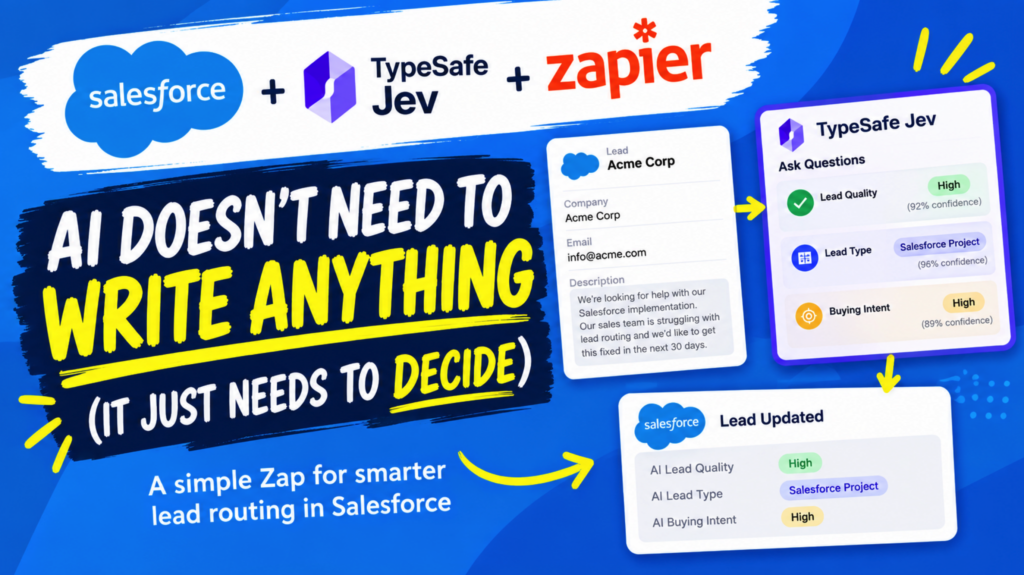
Most real Salesforce Leads also carry a Description field full of messy, human-written text like:
“We’re looking for help with our Salesforce implementation. Our sales team is struggling with lead routing and we’d like to get this fixed in the next 30 days.”
There’s real signal buried in there. It’s just not in a format Salesforce automation can act on — which is exactly the gap TypeSafe Jev and Zapier are built to close.
How TypeSafe Jev works inside a Zapier + Salesforce workflow
The workflow is simple: Salesforce → TypeSafe Jev → Salesforce.
When a new Lead comes into Salesforce, Zapier sends it to TypeSafe Jev, but instead of asking for a paragraph back, I ask a few specific questions:
- How strong is this opportunity? High / Medium / Low
- What type of opportunity is this? Salesforce Project / Salesforce Staffing / Salesforce Training / Other
- How strong is the buying intent? High / Medium / Low
TypeSafe Jev returns those answers, plus a confidence score, and Zapier writes them straight back into the Salesforce Lead record:
AI Lead Quality: High
AI Lead Type: Salesforce Project
AI Buying Intent: High
Now that messy Description has become structured Salesforce data your automation can actually use. (Slightly different setup in the video at the top of this article, but very similar structure)
Why TypeSafe Jev isn’t just another generative AI tool
I don’t need an essay about every Lead. I don’t need a chatbot reply or a 500-word summary. I need an answer:
- Is this Lead worth my attention?
- What type of opportunity is it?
- Does this person have an immediate need?
Once those answers are Salesforce fields, all your normal automation tooling opens up:
- Route high-quality Leads differently
- Auto-create follow-up tasks for high buying intent
- Send specific Leads to specific reps
- Trigger different nurture tracks
- Prioritize the Lead queue
- Flag anything that needs human eyes
TypeSafe Jev makes the interpretation. Salesforce runs the automation. [Good spot to link back to a past post on Flow-based Lead routing.]
Salesforce Flow still wins when the data is already structured
This isn’t a pitch to replace Salesforce Flow with AI, actually quite the opposite.
If you can write the logic as “If Industry = Healthcare AND Annual Revenue > $10M, do X,” you don’t need AI for that. Flow is still the right tool for structured logic.
AI earns its place only when the thing you need is buried inside text a human wrote. That’s the specific gap this TypeSafe Jev + Zapier + Salesforce setup bridges — and it’s worth every Salesforce Admin and Developer paying attention to.
Setting up TypeSafe Jev in Zapier: no code required
No custom code. No webhook. No prompt engineering rabbit hole.
- New Lead in Salesforce
- Ask Questions with TypeSafe Jev
- Update the Lead in Salesforce
You define the questions, the possible answers, and a confidence threshold, I used 50% here but had it show me it’s confidence for each answer. That threshold matters: you’re not just getting an answer, you’re getting how sure TypeSafe Jev is about it.
Which opens a second, quieter idea: don’t just automate on the answer, automate on the confidence. That’s how you keep a human in the loop exactly when the AI isn’t sure, and nowhere else.
Why Salesforce professionals should care about tools like TypeSafe Jev
More AI is landing inside the tools you already use, every quarter. But it’s worth resisting the assumption that every AI use case has to be a chatbot or a writing assistant.
Plenty of Salesforce business processes don’t need a paragraph. They need a decision:
- Yes or no
- Category A, B, or C
- High, medium, or low
Get that one answer, and your existing Salesforce automation takes it from there. That’s a more practical way to think about applying AI inside the Salesforce + Zapier ecosystem.
Watch TypeSafe Jev, Zapier, and Salesforce in action
Watch the video at the top of this article for the full walkthrough, from the raw Salesforce Lead through the TypeSafe Jev analysis to the final updated record.
Curious what else Zapier is building on the automation side? Check out the ZapConnect 2026 experience and Next Gen Zaps.
The takeaway: AI doesn’t always need to create something. Sometimes it just needs to decide something and let the Salesforce automations you already know and love handle the rest.
Watch Salesforce Career focused videos, listen to podcasts and check the menu items above for links to free content and courses.